
Organizations rely on forms every day. Application forms, customer registration forms, HR documents, expense requests, medical intake forms, supplier onboarding forms — they all drive operations.
The challenge begins when these forms remain as paper documents or static PDF files. Data becomes locked inside documents. Searching takes time. Manual entry creates errors. Reporting becomes difficult.
Form processing and data extraction solve this problem by converting forms into structured, validated, searchable data that can be used across business systems.
What Is Form Processing?
Form processing is the structured handling of paper or digital forms to make their content usable. It typically includes:
- Preparing the form for reading
- Identifying required data fields
- Capturing values inside those fields
- Verifying data accuracy
- Delivering structured output
The objective is not just to digitize documents — it is to transform form content into reliable operational data.
What Is Data Extraction from Forms?
Data extraction from forms is the process of capturing specific fields from structured or semi-structured documents and converting them into organized datasets.
Common extracted fields include:
- Full Name
- ID Number
- Application Number
- Date of Submission
- Phone Number
- Email Address
- Address
- Checked options or selections
- Amounts (if financial)
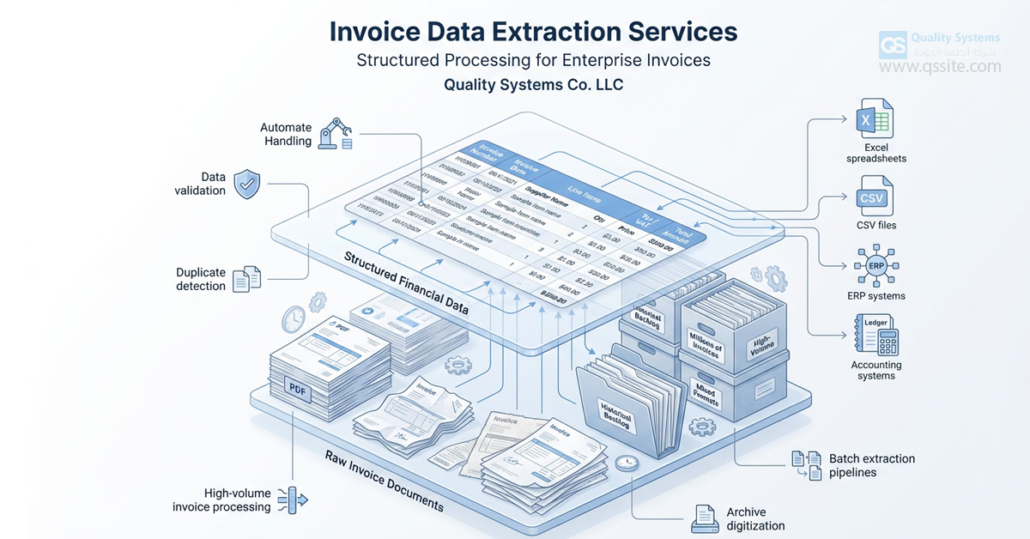
The result is structured data delivered in formats such as Excel, CSV, or database-ready files.
Why Form Processing Matters for Organizations
Forms are often the starting point of workflows. When form data is handled manually, organizations face:
- Slow processing times
- Repetitive data entry
- Human error
- Inconsistent records
- Limited searchability
- Delayed reporting
Structured form data extraction helps organizations:
- Accelerate processing cycles
- Reduce administrative workload
- Improve data accuracy
- Enable searchable archives
- Support compliance and reporting
Types of Forms That Can Be Processed
Form processing services can handle multiple formats and structures:
1. Handwritten Paper Forms
Applications and internal forms filled out manually.
2. Printed and Filled Paper Forms
Standard templates completed by hand or printer.
3. PDF Forms
Digital forms that may be fillable or scanned as images.
4. Multi-Source Forms
Forms collected from different branches, vendors, or departments with varying layouts.
Each category requires a structured approach to ensure consistency and accuracy.
Step-by-Step Form Processing Workflow
A reliable form processing project follows a structured methodology:
1. Assessment and Scope Definition
- Identify form types
- Estimate volume
- Define required data fields
- Define output format
Clear scope definition prevents rework later.
2. File Preparation and Quality Enhancement
Some forms may be:
- Skewed
- Low quality
- Faded
- Partially obscured
Improving readability increases extraction accuracy.
3. Field Mapping
Define which fields must be captured. For example:
- Application ID
- Customer Name
- Submission Date
- Contact Details
- Reference Numbers
Clear field mapping ensures consistency across thousands of forms.
4. Data Capture
Values are extracted and structured into defined fields.
5. Data Validation
Quality control ensures:
- Required fields are present
- Formats are consistent (dates, phone numbers, IDs)
- Duplicates are identified
- Totals match (in financial forms)
6. Structured Data Delivery
Output formats may include:
- Excel spreadsheets
- CSV files
- Database imports
- Direct system integration
Handling Large Backlogs of Forms
Many organizations accumulate years of archived forms stored in boxes or shared folders.
Common Backlog Challenges
- Inconsistent file naming
- Multiple versions of the same form
- Mixed quality scans
- Lack of indexing
Structured Backlog Strategy
- Segment forms by type
- Prioritize high-value or recent forms
- Process in controlled batches
- Deliver results in phases
This prevents operational disruption while gradually clearing the archive.

Industry Applications of Form Data Extraction
Human Resources
- Job applications
- Leave requests
- Employee onboarding forms
- Performance evaluations
Finance Departments
- Expense claim forms
- Payment request forms
- Internal approval forms
Customer Service
- Service request forms
- Complaint forms
- Feedback surveys
Healthcare Providers
- Patient registration forms
- Consent forms
- Intake documentation
Government and Public Sector
- Citizen application forms
- Permit requests
- Licensing forms
Key Benefits of Professional Form Processing
Organizations implementing structured form data extraction typically achieve:
- Reduced manual data entry
- Faster turnaround time
- Improved record accuracy
- Centralized searchable archive
- Better compliance readiness
- Enhanced reporting capabilities
Common Mistakes to Avoid
- Starting extraction without clearly defined fields
- Ignoring validation and quality control
- Overlooking duplicate detection
- Delivering unstructured outputs
- Failing to organize documents during processing
Avoiding these mistakes significantly improves long-term value.
Choosing the Right Form Processing Service Provider
When evaluating providers, consider:
- Ability to handle high volumes
- Clear validation methodology
- Structured output formats
- Experience with multiple form layouts
- Backlog processing capability
- Data confidentiality practices
Reliable form processing is not just about speed — it is about accuracy and structure.
Frequently Asked Questions
Can handwritten forms be processed?
Yes. Accuracy depends on handwriting clarity and document quality. Validation steps are typically included to maintain reliability.
Can multiple form layouts be processed in one project?
Yes. Forms are grouped by structure to ensure consistent field mapping.
What is the best output format?
Excel and CSV are common for analysis. Direct system integration may also be available depending on organizational needs.
Can historical archives be processed?
Yes. Backlogs can be handled in structured phases to minimize operational disruption.
Conclusion
Form processing and data extraction transform static documents into structured business intelligence.
Instead of storing information inside folders and cabinets, organizations gain:
- Organized databases
- Faster workflows
- Reduced errors
- Searchable records
- Stronger operational control
For organizations dealing with growing volumes of paper or PDF forms, structured data extraction is a foundational step toward efficiency and digital readiness.