Organize Your Files, Classify Your Documents, Start Your Smart Archiving Journey

Transform your document management workflow with an intelligent system that automatically organizes and classifies your PDF documents. Save time, reduce manual work, and keep your files perfectly organized.

Document Classification Solutions - Advanced solutions for automatic document classification

Contact Us Request a Quote

About the System

The system is designed to manage and automatically classify digital documents using rule-based algorithms (Rule-Based Classification) without the need for artificial intelligence. It supports text extraction from PDF files, keyword-based search, and automatic classification into multiple groups and folders.

A web-based platform that helps you upload, organize, and automatically classify PDF documents based on keywords you define. Whether you're managing invoices, contracts, reports, or any other documents, this system makes it easy to keep everything in order. Document Classification Solutions - Advanced solutions for document classification and management.
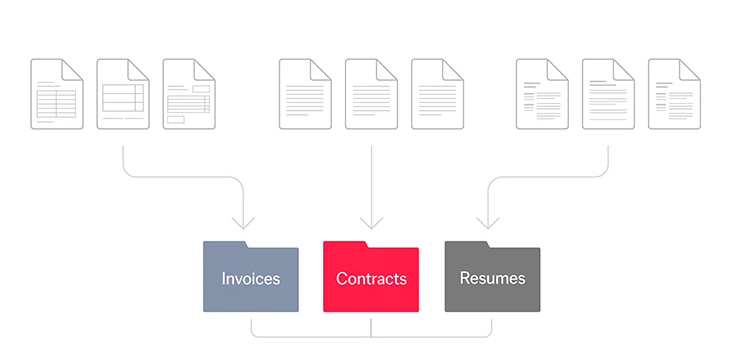
How Automatic Document Classification Works

Automatic document classification process - Classifying invoices, contracts, and resumes into separate folders
1

Setup & Preparation

Start by creating keyword groups and define which keywords should classify documents into which folders. Then create a document batch and select the keyword groups to be used for classification.

  • Create keyword groups
  • Create a new document batch
  • Select keyword groups
2

Upload & Processing

Upload your PDF files (digital or scanned) and let the system process them automatically. The system extracts text and searches for keywords.

  • Upload PDF files (one or more)
  • Automatic text extraction
  • Search for keywords
  • Arabic and English support
3

Classification & Results

The system automatically selects the best matching category and classifies the document into the appropriate folder. You can review results and download classified documents.

  • Select best matching category
  • Automatic document classification
  • Review results
  • Download classified documents

Key Features

Rule-Based Smart Classification

Upload your PDF files and let the system automatically classify them into the right folders based on keywords. No more manual sorting!

Document Groups Management

Group related documents together in batches. Perfect for organizing documents by project, department, or time period.

Digital and Scanned PDF Support

Works with both digital PDFs (text-based) and scanned documents. The system can read text from all types of documents.

Case-Insensitive Keyword Matching

Matches keywords regardless of uppercase/lowercase. Finds keywords even when part of larger words.

Multi-Folder Classification

Organize documents into multiple categories simultaneously. One batch can classify documents into different folders based on different keyword groups.

Auto Reclassification

Re-run classification with updated keywords. The system automatically reclassifies documents when rules are updated.

Cloud-Ready & Future Scalability

Scalable architecture ready for cloud hosting. Handles small batches or thousands of documents efficiently.

Use Cases

Government Institutions

Description: Archiving official transactions

Usage Examples:

  • Classifying contracts and correspondence
  • Archiving official documents
  • Organizing government transactions

Private Companies

Description: Managing legal and financial documents

Usage Examples:

  • Classifying invoices and reports
  • Organizing financial documents
  • Archiving legal documents

Law Firms

Description: Quick search in cases and documents

Usage Examples:

  • Classifying defense memos
  • Organizing case files
  • Searching legal documents

Technical Capabilities

Text Extraction

  • Works with digital PDFs and scanned documents
  • Bilingual Support: Arabic and English
  • Automatic text extraction from documents

Classification Algorithm

  • Rule-Based: Keyword matching
  • Best Match Selection
  • Case-Insensitive
  • Substring Matching

Processing

  • Asynchronous Processing
  • Multiple File Upload
  • Real-time Progress Tracking
  • Automatic Error Handling

Benefits

Time Saving

Automatically classify hundreds of documents in minutes instead of hours of manual work.

Accuracy

Consistent classification based on predefined rules. No human errors or inconsistencies.

Organization

All documents automatically organized in the right folders. Easy to find what you need.

Searchability

Search through document content, not just file names. Find documents by what's inside them.

Frequently Asked Questions

What is a document classification system?

A document classification system is an intelligent web platform that helps you upload, organize, and automatically classify PDF documents based on keywords you define. The system automatically classifies documents into appropriate folders without the need for manual sorting.

How does automatic classification work?

The system extracts text from PDF files, then searches for the keywords you define. After that, the system selects the best matching category based on the number of matched keywords and automatically classifies the document into the appropriate folder.

Does the system support scanned documents?

Yes, the system supports both digital PDFs (text-based) and scanned documents. The system can read text from all types of documents using advanced technologies.

What languages are supported?

The system fully supports Arabic and English. You can use keywords in Arabic, English, or both to classify documents.

How can I get started using the system?

To get started, create keyword groups and define the appropriate categories and folders. Then create a document batch and select keyword groups. After that, upload your PDF files and let the system perform automatic classification.

Support & Contact

Quality Systems W.L.L.

Address:

Al Farwaniyah Complex Ground Floor - Office: 3 – Kuwait

WhatsApp:

+96555552144

Official Website:

www.qssite.com

Contact Us:

Contact Page